AI Remediation Guide
AI Remediation is the Fix rung of the verb ladder — turning waste findings into action. Every plan gets remediation on the Remediation page: each finding shows its recommendation plus the exact Console and CLI steps to fix it yourself. On the Agentic plan, the same findings also get one-click execution — you review the agent's Bedrock-generated plan, approve it, and CloudWise runs the fix in your AWS account with full rollback capability.
Manual vs. automatic remediation
Remediation is one experience that expands with your plan. Open the Remediation page and you'll see your waste findings with how to fix each one:
| Plan | What you get |
|---|---|
| Free / Shield | Every finding with step-by-step Console + CLI instructions you run yourself, filterable by confidence, risk, category, and account |
| Agentic | The same findings — plus a one-click Approve & fix that executes the plan in your account (with pre-checks and rollback) |
| Compliance | Propose-only by design (air-gapped) — guided instructions, no execution |
The fix instructions and the risk/confidence model (below) apply to everyone. The rest of this guide covers the automatic (Agentic) execute flow — planning, approval, execution, and rollback.
Guided fix instructions appear on the Remediation page for every plan. Only the Agentic plan ($49/mo or $399/year) adds one-click execution inside your account. Free and Shield are propose-only (you run the steps); Compliance is propose-only by design (air-gapped). Upgrade →
Architecture Overview
The diagram below shows the end-to-end flow of execute-mode remediation — from approving an action on the Remediation page through IAM role chaining, pre-checks, execution, and rollback.
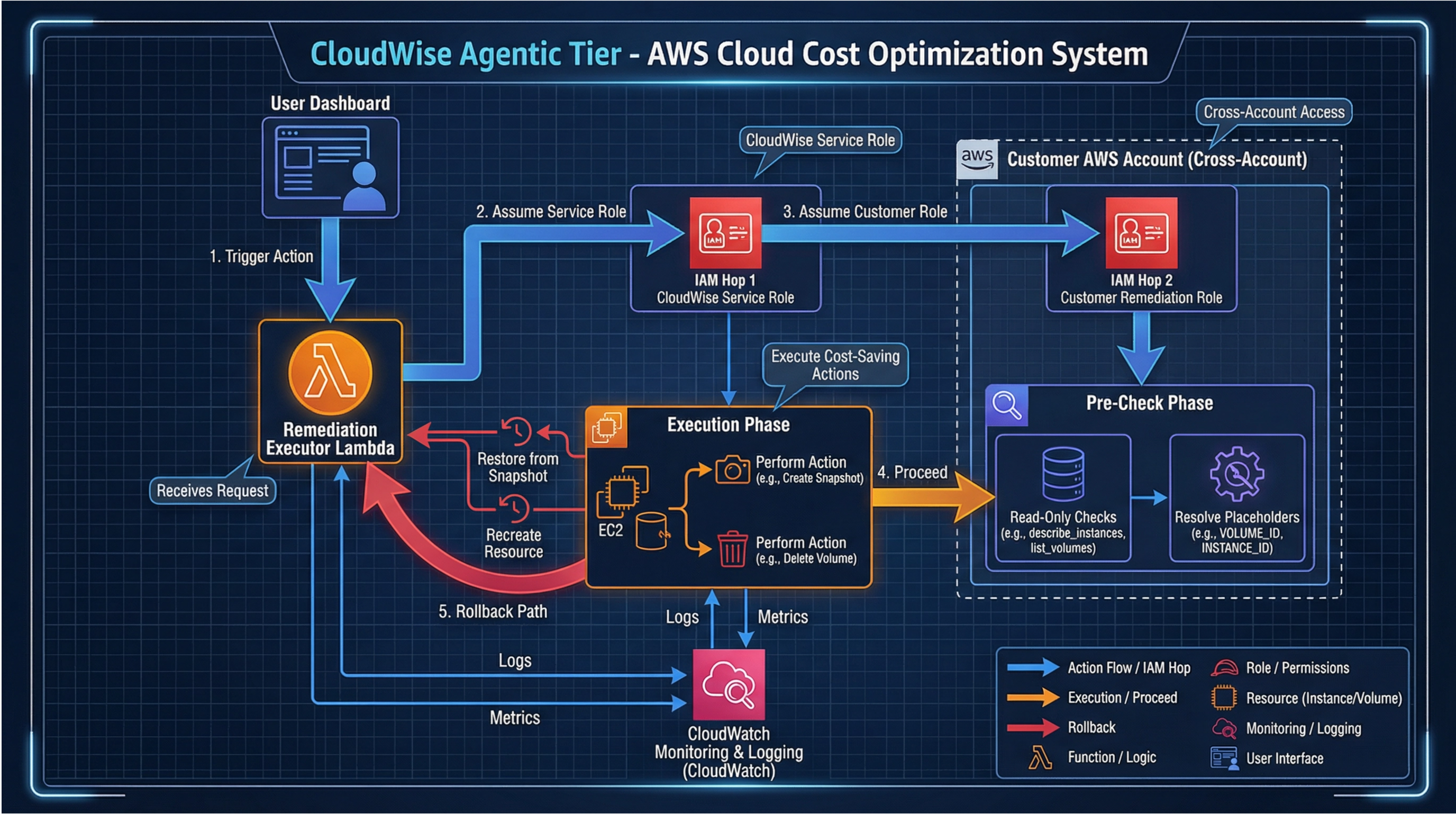
Key components:
- Remediation page — Review findings, approve remediation actions, and monitor execution status (the same page shows guided fix instructions on every plan)
- IAM Hop 1 (CloudWise Service Role) — CloudWise assumes its own service role to initiate cross-account access
- IAM Hop 2 (Customer Remediation Role) — A scoped role in your AWS account with only cost-saving permissions
- Pre-Check Phase — Read-only checks (e.g.,
describe_instances,list_volumes) verify the resource state and resolve placeholders (e.g.,VOLUME_ID,INSTANCE_ID) before any writes occur - Execution Phase — Performs the approved actions (e.g., create snapshot, delete volume) with full CloudWatch logging and metrics
- Rollback Path — If anything fails, CloudWise automatically restores from snapshots or recreates resources
- CloudWatch Monitoring — All actions, logs, and metrics are recorded for audit
🎯 How It Works
CloudWise Remediation follows a strict human-in-the-loop workflow. No action is ever executed without your explicit approval.
Waste Detection Scan
        ↓
Confidence Filtering (your threshold)
        ↓
AI Remediation Planner (Bedrock — Anthropic Claude)
        ↓
Deterministic Risk Classification
        ↓
Policy Filtering (your rules)
        ↓
Plan Validation (allow-list enforcement)
        ↓
Action Created → Pending Approval
        ↓
You Review & Approve (or Reject)
        ↓
CloudWise Executes via Cross-Account Role
        ↓
Verification & Rollback Available
Pipeline Steps
- Waste Detection — CloudWise scans 17 AWS regions for idle, unused, and over-provisioned resources across 189 waste types
- Confidence Filtering — Each finding has a confidence level (High, Medium, or Low). Only findings at or above your configured Minimum Confidence Level proceed to planning. Default: Medium (skips Low confidence findings)
- Remediation Planning — Eligible findings are sent to Amazon Bedrock (Anthropic Claude), which generates a specific execution plan with pre-checks, API calls, and rollback steps
- Risk Classification — Every action is deterministically classified as Low, Medium, or High risk based on the waste type (no LLM involvement in risk scoring)
- Policy Filtering — Your remediation policy controls which actions are proposed: risk threshold, confidence threshold, excluded tags, resource IDs, and waste types
- Allow-List Validation — Every API call in the plan is validated against a strict allow-list of 40+ AWS services. Any plan containing disallowed actions is rejected automatically
- Approval Queue — Valid actions appear on the Remediation page with status
Pending Approvaland a 72-hour expiry window - Execution — Approved actions execute via a scoped IAM role in your AWS account with pre-flight checks
- Audit Trail — Every action is logged with timestamps, results, rollback information, and Bedrock model/token usage
🚀 Getting Started
Step 1: Deploy the Remediation Role
AI Remediation requires a write-access IAM role in each AWS account you want to remediate. This is separate from the read-only role used for cost monitoring.
- Go to Settings → Remediation Policy
- Click Deploy in AWS Console
- Upload the downloaded template when the CloudFormation console opens
- Accept the default parameters and deploy
The settings page downloads the template and opens the CloudFormation console automatically. Default parameters work for most setups — just click through the wizard.
The CloudWiseRemediationRole is scoped to cost-saving actions only:
- ✅ Stop/terminate EC2 instances
- ✅ Delete unattached EBS volumes and old snapshots
- ✅ Release unused Elastic IPs
- ✅ Delete idle NAT Gateways and Load Balancers
- ✅ Modify over-provisioned resources (Lambda, DynamoDB, EBS)
- ✅ Clean up unused secrets, KMS keys, API Gateways
- ❌ No IAM, VPC, or security group access
- ❌ No data access (S3 objects, databases)
- ❌ 15-minute session cap (cannot maintain persistent access)
Step 2: Configure Your Policy
Navigate to Settings → Remediation Policy to customize:
- Confidence threshold — How certain a finding must be before generating a plan
- Risk threshold — Which risk levels to include
- Safety caps — Maximum daily actions and savings impact
- Exclusions — Tags, resource IDs, and waste types to skip
- Notifications — Email and Slack alerts
Step 3: Review & Approve Actions
After the next processing cycle, remediation actions will appear on the Remediation page. Review each action's plan, then approve or reject.
⚙️ Configuration Reference
Remediation Engine Toggle
| Setting | Default | Description |
|---|---|---|
| Enable Remediation | On | Master switch. When disabled, no new remediation actions are generated. Existing pending actions remain but no new ones are created. |
Risk & Confidence Controls
Confidence and risk are independent filters that work at different stages of the pipeline:
- Confidence = "How certain are we this resource is waste?" — Filters findings before plan generation. Based on usage signals (e.g., an EBS volume unattached for 90 days is high confidence; a log group with no retention policy set is low confidence).
- Risk = "How impactful would this remediation be?" — Filters actions during plan generation. Based on the type of remediation (e.g., deleting an unattached volume is low risk; stopping a running instance is high risk).
A finding can be high-confidence + high-risk (e.g., an idle EC2 instance clearly unused for 30 days) or low-confidence + low-risk (e.g., a log group flagged for missing retention policy). The two dimensions are orthogonal.
Minimum Confidence Level
Controls which waste findings are eligible for remediation planning:
| Level | Setting | What Gets Considered |
|---|---|---|
| High (Most certain) | Only highest-confidence findings | Resources with strong inactivity signals (zero usage for 30+ days, zero API calls, unattached 90+ days) |
| Medium (Recommended) | High + Medium confidence | Above + resources with moderate signals (low utilization, no recent changes, outdated configurations) |
| Low (All findings) | All confidence levels | Above + resources flagged by heuristics (missing best-practice settings, potential over-provisioning) |
If you see waste findings in your dashboard that don't have remediation actions, they may be filtered by the confidence threshold. Lowering it to Low will generate plans for all findings, but some may be less certain about the resource being actual waste. Review these plans more carefully.
Maximum Risk Level
Controls which risk levels are proposed for remediation:
| Level | Setting | What Gets Proposed |
|---|---|---|
| Low (Safest) | Only lowest-risk actions | Unattached volumes, old snapshots, unused Elastic IPs, lifecycle policies, Lambda timeout/runtime/ARM64 recommendations, excessive log retention, empty log groups, Glue job timeouts, failed Glue job retries, EMR auto-termination, previous-gen instances, Spot opportunities |
| Medium (Recommended) | Low + Medium risk | Above + stopped instances, GP2→GP3 migrations, idle NAT Gateways, idle load balancers, unused secrets and API Gateways, idle Lambda Provisioned Concurrency, over-provisioned EMR clusters, WorkSpaces AutoStop/pool optimization |
| High (All) | All risk levels | Above + idle running instances, idle databases, unused Lambda functions, idle services |
Risk Classification
Every waste type is deterministically mapped to a risk level — no AI/LLM is involved in risk scoring. The complete classification across all 189 classified waste types:
Low Risk ✅ — Safe to act on immediately (80 waste types):
| Waste Type | Why It's Low Risk |
|---|---|
unattached_ebs | Not connected to any instance |
old_ebs_snapshot | Aged out, point-in-time copy exists |
orphaned_ebs_snapshot | Source volume deleted — snapshot serves no recovery purpose |
ami_orphaned_snapshot | AMI deregistered — backing snapshot no longer needed |
unattached_eip | AWS charges $0.005/hr for unused EIPs |
eip_on_stopped_instance | Paying for idle elastic IP |
incomplete_multipart | Incomplete uploads consuming storage |
old_ecr_images | Container images past retention |
untagged_ecr_images | Untagged images consuming registry space |
old_log_group | Aged-out log data |
no_retention_log_group | Infinite retention accumulates cost |
excessive_retention_log_group | Retention reduction — old data ages out naturally |
empty_log_group | Delete empty group — zero data loss risk |
unused_dashboard | No monitoring value |
orphaned_dns_record | DNS record pointing to deleted resource |
cloudtrail_s3_no_lifecycle | CloudTrail S3 bucket without lifecycle rules |
ecr_no_lifecycle_policy | ECR repo without image cleanup |
no_lifecycle_policy / no_lifecycle_efs | Missing lifecycle configuration |
stopped_sagemaker_notebook_storage | Stopped notebook with EBS storage charges |
previous_gen_sagemaker_instance | Old-gen instance type — recommend upgrade |
high_lcu_cost_alb | ALB with high LCU costs — advise optimization |
classic_lb_migration | Classic LB migration — recommend upgrade to ALB/NLB |
lambda_excessive_timeout | Timeout reduction — no cost impact, improves hygiene |
lambda_arm64_migration | ARM64 migration opportunity — architecture recommendation |
lambda_old_runtime | Deprecated runtime — housekeeping flag |
s3_rapid_growth | Recommendation-only — advises lifecycle rules for fast-growing buckets |
s3_wrong_storage_class | Recommendation-only — advises Intelligent-Tiering migration |
s3_empty_bucket | Empty bucket cleanup — zero data loss risk |
s3_high_request_and_transfer_cost | Recommendation-only — advises request pattern optimization |
redshift_spectrum_heavy | Recommendation-only — advises Athena evaluation for Spectrum workloads |
redshift_legacy_dc2 | Recommendation-only — advises RA3 migration planning |
redshift_concurrency_scaling_waste | WLM tuning recommendation — no service impact |
oversized_glue_job | Advisory — DPU right-sizing recommendation |
glue_job_missing_timeout | Timeout reduction — jobs still run, just fail faster if stuck |
failed_glue_job_retry | Disable retries — jobs still run once, just don't retry on failure |
glue_dev_endpoint_migration | Advisory — migration to Interactive Sessions recommendation |
glue_catalog_bloat | Advisory — table version cleanup recommendation |
ecs_container_insights_waste | Monitoring change — basic ECS metrics remain free |
backup_no_lifecycle_tiering | Advisory — lifecycle tiering recommendation |
stale_backup_plan_assignment | Advisory — backup plan selection cleanup |
backup_copy_policy_overreach | Advisory — cross-region copy policy review |
s3_no_default_encryption | Advisory — recommends customer-managed KMS encryption |
aurora_io_optimization_opportunity | Billing config change — switch to I/O-Optimized, no downtime |
aurora_extended_support_cost | Advisory — recommends engine version upgrade to avoid surcharge |
rds_extended_support_cost | Advisory — recommends RDS engine upgrade to avoid Extended Support surcharge |
elasticache_extended_support_cost | Advisory — recommends ElastiCache engine upgrade to avoid Extended Support surcharge |
elasticache_engine_migration | Advisory — recommends Valkey migration for 20% savings, Redis 7.x API compatible |
elasticache_serverless_optimization | Advisory — recommends Serverless for spiky workloads, manual migration required |
elasticache_data_tiering_opportunity | Advisory — recommends R6gd data tiering for large datasets, manual migration required |
eks_extended_support_cost | Advisory — recommends Kubernetes version upgrade to avoid EKS Extended Support charges |
opensearch_extended_support_cost | Advisory — recommends domain version upgrade to avoid legacy support surcharge |
documentdb_extended_support_cost | Advisory — recommends DocumentDB engine upgrade to avoid Extended Support surcharge |
aurora_serverless_opportunity | Advisory — recommends Serverless v2 migration for low-utilization clusters |
neptune_serverless_opportunity | Recommendation only — Serverless migration requires new cluster |
oversized_mq_broker | Recommendation only — MQ doesn't support in-place instance changes |
lightsail_unattached_static_ip | Unattached static IP — no instance dependency, $3.65/mo flat charge |
appsync_idle_subscriptions | AppSync idle subscriptions — advisory (architecture review) |
ri_opportunity_opensearch | RI commitment purchase — advisory, non-refundable |
emr_missing_auto_termination | Advisory — auto-termination policy is a configuration setting, no workload impact |
emr_previous_gen_instances | Advisory — recommends upgrading to current-gen instance types |
emr_spot_opportunity | Advisory — recommends Spot for task nodes, no impact on running workloads |
beanstalk_unnecessary_alb | Advisory — switch from LoadBalanced to SingleInstance when min=max=1 |
beanstalk_previous_gen_instances | Advisory — recommends upgrading to current-gen instance types |
workspaces_windows_license_optimization | Advisory — BYOL licensing review, no infrastructure changes |
oversized_ec2_optimizer | Compute Optimizer recommendation — advisory rightsizing suggestion |
oversized_ebs_optimizer | Compute Optimizer recommendation — advisory rightsizing suggestion |
oversized_lambda_optimizer | Compute Optimizer recommendation — advisory rightsizing suggestion |
oversized_rds_optimizer | Compute Optimizer recommendation — advisory rightsizing suggestion |
ri_opportunity_ec2 | RI purchase recommendation — advisory, informational only |
ri_opportunity_rds | RI purchase recommendation — advisory, informational only |
ri_opportunity_elasticache | RI purchase recommendation — advisory, informational only |
ri_opportunity_redshift | RI purchase recommendation — advisory, informational only |
sp_opportunity_compute | SP purchase recommendation — advisory, informational only |
sp_opportunity_ec2 | SP purchase recommendation — advisory, informational only |
sp_opportunity_sagemaker | SP purchase recommendation — advisory, informational only |
savings_plan_coverage_gap | SP coverage gap — advisory, informational only |
convertible_ri_exchange_opportunity | Convertible RI exchange — advisory, informational only |
kinesis_on_demand_downgrade | Billing mode switch — reversible, no data impact |
kinesis_extended_retention_waste | Retention decrease to default 24h — no data loss for active consumers |
Medium Risk ⚠️ — Review before acting (75 waste types):
| Waste Type | Why It's Medium Risk |
|---|---|
stopped_ec2_with_ebs | EBS volumes still incurring charges |
gp2_migration | Performance characteristics change (GP2 → GP3) |
over_provisioned_iops | IOPS reduction |
over_provisioned_lambda | Memory/timeout reduction |
lambda_provisioned_concurrency_idle | Deleting/reducing PC configs affects cold start behavior |
over_provisioned_dynamodb | Capacity mode change |
dynamodb_no_autoscaling | Switch to on-demand billing |
idle_nat_gateway | May have intermittent traffic |
multiple_eips_per_instance | EIP consolidation |
old_rds_snapshot | Aged RDS snapshot |
old_documentdb_snapshot | Aged DocumentDB snapshot — irreversible deletion |
old_fsx_backup | Aged FSx backup — irreversible deletion |
old_backup | Past retention window — verify backup policy |
idle_load_balancer | Load balancer with no healthy targets |
low_traffic_alb | Load balancer with near-zero traffic |
unused_vpc_endpoint | VPC endpoint with no traffic |
oversized_elasticache | Cache cluster right-sizing |
elasticache_replication_waste | Non-production replica removal — reversible via increase_replica_count |
oversized_ecs_task | Task definition right-sizing |
ecs_no_autoscaling | Auto-scaling configuration requires workload analysis |
oversized_ecs_memory | Memory right-sizing — may cause OOM if usage spikes |
redshift_no_pause | Creates scheduled pause action — reversible |
idle_kinesis_stream | Stream with no throughput |
over_provisioned_kinesis | Shard count reduction |
kinesis_enhanced_fan_out_waste | Deregister idle enhanced fan-out consumer |
kinesis_firehose_idle | Delete idle Firehose delivery stream |
idle_glue_dev_endpoint | Unused Glue development endpoint |
old_glue_job | Stale Glue job definition |
idle_glue_crawler | Crawler with no recent runs |
idle_state_machine | Step Function with no executions |
step_functions_retry_storm | State machine with excessive retry ratio and failure rate |
step_functions_high_transition_density | Workflow with excessive transitions per success |
step_functions_express_duration_waste | Express workflow with high p95 duration |
redundant_backup | Duplicate backup |
unused_secret | Secrets Manager secret unused for 90+ days |
idle_sagemaker_notebook | Notebook instance running idle |
oversized_sagemaker_endpoint | Endpoint with low CPU/memory utilization |
oversized_msk_cluster | Downsizing requires workload analysis |
overprovisioned_documentdb | Instance right-sizing requires workload analysis |
oversized_neptune | Instance class change — brief downtime |
neptune_old_snapshot | Snapshot deletion — irreversible |
oversized_fsx | Storage right-sizing — advisory only in v1 |
fsx_throughput_overprovisioned | Throughput right-sizing — advisory only in v1 |
underutilized_redshift | Low CPU but active connections — right-sizing |
oversized_opensearch | Node rightsizing requires workload analysis |
opensearch_ebs_overprovisioned | EBS resizing requires planned reconfiguration |
redshift_wlm_over_provisioned | WLM concurrency right-sizing requires workload analysis |
unused_api_gateway | API Gateway with zero calls in 30 days |
unused_appsync | AppSync API with no queries |
appsync_idle_cache | AppSync idle cache — no hits in 14 days |
unused_distribution | Unused CloudFront distribution |
unused_hosted_zone | Unused Route 53 hosted zone |
unused_kms_key | Unused KMS key |
unencrypted_ebs_volume | Advisory — encryption-at-rest gap, requires snapshot copy to encrypt |
unencrypted_rds_instance | Advisory — encryption-at-rest gap, requires read replica promotion |
unencrypted_efs_filesystem | Advisory — encryption cannot be changed after creation |
opensearch_no_encryption_at_rest | Advisory — encryption-at-rest gap, requires domain reconfiguration |
unencrypted_documentdb_cluster | Advisory — encryption cannot be changed after creation |
rds_no_deletion_protection | Advisory — recommends enabling DeletionProtection |
dynamodb_no_deletion_protection | Advisory — recommends enabling deletion protection |
resource_without_backup_coverage | Advisory — resource not covered by any AWS Backup selection |
lightsail_unattached_disk | Block storage disk deletion — irreversible without snapshot |
lightsail_old_snapshot | Snapshot deletion — irreversible, verify no recovery need |
lightsail_idle_load_balancer | Load balancer with zero healthy instances — may have intermittent traffic |
unused_transfer_protocol | Transfer server with unused protocols — review protocol configuration |
aurora_to_rds_downgrade_opportunity | Aurora to RDS downgrade — requires migration planning |
emr_over_provisioned | Over-provisioned EMR instance groups — right-sizing requires workload analysis |
beanstalk_over_provisioned | Over-provisioned Beanstalk environment — CPU <25% over 14 days, right-sizing requires workload analysis |
workspaces_autostop_opportunity | Billing mode switch — AlwaysOn to AutoStop changes billing model. Guarded auto-remediation: executor validates AlwaysOn state, checks deny-tag (cloudwise:autostop-deny=true), and verifies modifiable state before execution |
workspaces_pool_overprovisioned_capacity | Pool capacity reduction — may affect user availability during peaks |
oversized_workspace | WorkSpace bundle right-sizing requires usage analysis |
oversized_redshift | Redshift cluster right-sizing requires workload analysis |
expiring_reserved_instance | RI approaching expiry — advisory, renewal planning |
expiring_savings_plan | SP approaching expiry — advisory, renewal planning |
disabled_global_accelerator | Disabled accelerator still incurring charges — review before deleting |
High Risk 🔴 — Significant resource changes (36 waste types):
| Waste Type | Why It's High Risk |
|---|---|
idle_ec2 | Running instance — may have workloads |
idle_rds | Running database — may have connections |
idle_elasticache | Running cache — may serve traffic |
idle_redshift | Running data warehouse |
idle_opensearch | Running search cluster |
idle_emr_cluster | Running EMR cluster |
idle_sagemaker_endpoint | Running inference endpoint |
idle_msk_cluster | Running Kafka cluster |
idle_mq_broker | Running message broker |
idle_neptune | Running graph database |
idle_documentdb | Running document database |
unused_lambda | May be invoked by other services |
idle_ecs_service | Running containers |
idle_dynamodb | DynamoDB table with provisioned capacity |
idle_fsx | Running file system |
idle_efs | Elastic File System with no mounts |
idle_beanstalk | Running Elastic Beanstalk environment |
beanstalk_idle_traffic | EB environment with zero traffic for 14 days |
beanstalk_orphaned_rds | Orphaned RDS left behind by terminated EB environment |
idle_lightsail | Running Lightsail instance |
lightsail_idle_database | Managed database with zero connections |
idle_workspace | Running WorkSpace |
idle_transfer_server | Running Transfer Family server |
idle_transfer_no_activity | Transfer server with no file activity |
idle_transfer_web_app | Idle Transfer Family web app |
unused_accelerator | Global Accelerator |
idle_global_accelerator | Global Accelerator with zero traffic for 30 days |
long_running_emr | Long-running EMR cluster |
duplicate_cloudtrail | Redundant trail — verify compliance requirements before deleting |
rds_publicly_accessible | RDS instance with public access enabled — high security risk |
cur_savings_plan_waste | CUR-detected unused Savings Plan coverage |
cur_unused_reservation | CUR-detected underutilized Reserved Instance |
unused_reserved_instance | Reserved Instance with low utilization |
unused_savings_plan | Savings Plan with low utilization |
Max Daily Actions
| Setting | Default | Range | Description |
|---|---|---|---|
| Max Daily Actions | 50 | 1–200 | Maximum number of remediation actions that can be executed in a single day. Prevents runaway automation. Enforced at execution time — an approved action that would exceed the cap fails with a policy-blocked reason rather than executing. |
Max Daily Savings Impact
| Setting | Default | Description |
|---|---|---|
| Max Daily Savings Impact | $10,000 | Safety cap on the total dollar value of actions executed per day. Even if you approve more, execution pauses when this limit is reached — enforced at execution time, the same way as Max Daily Actions above. |
Blackout Hours
A policy can carry a list of UTC hours (0–23) during which no remediation action executes, even one already approved. An action whose execution lands in a blackout hour fails with a policy-blocked reason; use Retry (see Action Lifecycle below) once the hour has passed. Enforced at execution time; not yet configurable from Settings (internal/ops-set for now).
Notification Channels
| Channel | Default | Description |
|---|---|---|
| On | Approval requests, execution results, daily digest | |
| Slack | Off | Real-time notifications to a dedicated channel (see Slack Integration Guide) |
Remediation Slack messages include:
- Per-action: Title, description, API calls, rollback steps, confidence level
- Batch digest: Summary with counts by status and top savings
- Direct links to the specific action on the Remediation page
Exclusions
Excluded Resource Tags
Resources with matching tags are never proposed for remediation. Use Key=Value format. Enforced both at plan time and at execution time: right before every execution, CloudWise re-reads the resource's current tags from AWS and blocks the action if they match — a resource tagged after the plan was made is still protected. 12 AWS services (EC2, RDS, S3, Lambda, ELB/ALB/NLB, ElastiCache, Secrets Manager, Amazon MQ, Route 53, Elastic Beanstalk, and Lightsail) have a dedicated tag-read call; every other service — including Glue jobs/crawlers, SageMaker notebooks/endpoints, and Timestream databases — falls back to the AWS Resource Groups Tagging API, so coverage spans nearly every remediable resource type. The one remaining gap is ECS: a service's tag-bearing ARN needs its cluster name, which a plan may carry but this guard will not trust unverified, so ECS remediations stay blocked while any excluded tags are configured. If tags cannot be verified for a resource — no way to determine its ARN, the tag-read call itself fails, or AWS reports no record of the resource — the action is blocked rather than executed unverified.
This guard requires remediation role template v1.32.0 or later. On an older template, none of the tag-read permissions exist yet, so every remediation action is blocked (fail closed) rather than executed with unverified tags, until the role is updated (Settings → AWS Accounts shows an update prompt when a newer template is available). See docs/ops/remediation-role-v1.32-migration.md for what changed and how to update.
Common exclusions:
Environment=Production— Skip all production resourcesTeam=Platform— Skip platform team resourcesDoNotDelete=true— Explicit protection tagCostCenter=Shared— Skip shared-cost resources
Excluded Resource IDs
Specific AWS resources that should never be remediated, by resource ID. Also enforced at execution time — an excluded resource ID or ARN blocks execution outright, even for an action that was proposed before the exclusion was added.
Examples:
i-0abc123def456— A specific EC2 instancevol-0abc123def456— A specific EBS volumesnap-0abc123def456— A specific snapshot
Excluded Waste Types
Deselect specific waste detection categories from remediation. The full list of 189 classified waste types:
| Category | Waste Types |
|---|---|
| EC2 | idle_ec2, stopped_ec2_with_ebs |
| EBS | unattached_ebs, old_ebs_snapshot, orphaned_ebs_snapshot, ami_orphaned_snapshot, gp2_migration, over_provisioned_iops |
| RDS | idle_rds, old_rds_snapshot, aurora_io_optimization_opportunity, aurora_extended_support_cost, rds_extended_support_cost, aurora_serverless_opportunity, aurora_to_rds_downgrade_opportunity |
| Networking | unattached_eip, eip_on_stopped_instance, multiple_eips_per_instance, idle_nat_gateway, idle_load_balancer, low_traffic_alb, high_lcu_cost_alb, classic_lb_migration, unused_vpc_endpoint, orphaned_dns_record |
| Serverless | unused_lambda, over_provisioned_lambda, unused_api_gateway, lambda_provisioned_concurrency_idle, lambda_excessive_timeout, lambda_arm64_migration, lambda_old_runtime |
| DynamoDB | idle_dynamodb, over_provisioned_dynamodb, dynamodb_no_autoscaling |
| Containers | idle_ecs_service, oversized_ecs_task, ecs_no_autoscaling, ecs_container_insights_waste, oversized_ecs_memory, idle_elasticache, oversized_elasticache, eks_extended_support_cost, elasticache_extended_support_cost, elasticache_replication_waste, elasticache_engine_migration, elasticache_serverless_optimization, elasticache_data_tiering_opportunity |
| Data | idle_kinesis_stream, over_provisioned_kinesis, kinesis_on_demand_downgrade, kinesis_extended_retention_waste, kinesis_enhanced_fan_out_waste, kinesis_firehose_idle, idle_redshift, underutilized_redshift, oversized_redshift, redshift_no_pause, redshift_spectrum_heavy, redshift_legacy_dc2, redshift_wlm_over_provisioned, redshift_concurrency_scaling_waste, idle_opensearch, oversized_opensearch, opensearch_ebs_overprovisioned, ri_opportunity_opensearch, opensearch_extended_support_cost |
| ML | idle_sagemaker_notebook, idle_sagemaker_endpoint, oversized_sagemaker_endpoint, stopped_sagemaker_notebook_storage, previous_gen_sagemaker_instance |
| DevOps | idle_glue_dev_endpoint, old_glue_job, idle_glue_crawler, oversized_glue_job, glue_job_missing_timeout, failed_glue_job_retry, glue_dev_endpoint_migration, glue_catalog_bloat, idle_state_machine, step_functions_retry_storm, step_functions_high_transition_density, step_functions_express_duration_waste, idle_emr_cluster, long_running_emr, emr_over_provisioned, emr_missing_auto_termination, emr_previous_gen_instances, emr_spot_opportunity |
| Storage | old_backup, redundant_backup, backup_no_lifecycle_tiering, stale_backup_plan_assignment, backup_copy_policy_overreach, unused_secret, idle_fsx, idle_efs, no_lifecycle_efs, oversized_fsx, fsx_throughput_overprovisioned, old_fsx_backup |
| Monitoring | unused_dashboard, old_log_group, no_retention_log_group, excessive_retention_log_group, empty_log_group |
| Security Posture | unencrypted_ebs_volume, unencrypted_rds_instance, rds_no_deletion_protection, rds_publicly_accessible, unencrypted_efs_filesystem, s3_no_default_encryption, dynamodb_no_deletion_protection, opensearch_no_encryption_at_rest, unencrypted_documentdb_cluster, resource_without_backup_coverage |
| ECR | old_ecr_images, untagged_ecr_images, ecr_no_lifecycle_policy, no_lifecycle_policy |
| CloudTrail | duplicate_cloudtrail, cloudtrail_s3_no_lifecycle |
| S3 | incomplete_multipart, s3_rapid_growth, s3_wrong_storage_class, s3_empty_bucket, s3_high_request_and_transfer_cost |
| Messaging | idle_msk_cluster, oversized_msk_cluster, idle_mq_broker, oversized_mq_broker |
| Databases | idle_neptune, neptune_serverless_opportunity, oversized_neptune, neptune_old_snapshot, idle_documentdb, overprovisioned_documentdb, old_documentdb_snapshot, documentdb_extended_support_cost |
| Niche | idle_beanstalk, beanstalk_idle_traffic, beanstalk_unnecessary_alb, beanstalk_previous_gen_instances, beanstalk_over_provisioned, beanstalk_orphaned_rds, idle_lightsail, lightsail_unattached_static_ip, lightsail_unattached_disk, lightsail_old_snapshot, lightsail_idle_load_balancer, lightsail_idle_database, idle_workspace, oversized_workspace, workspaces_autostop_opportunity, workspaces_pool_overprovisioned_capacity, workspaces_windows_license_optimization, idle_transfer_server, idle_transfer_no_activity, unused_transfer_protocol, idle_transfer_web_app, unused_accelerator, idle_global_accelerator, disabled_global_accelerator, unused_appsync, appsync_idle_cache, appsync_idle_subscriptions, unused_distribution, unused_hosted_zone, unused_kms_key |
| RI/SP & Optimizer | oversized_ec2_optimizer, oversized_ebs_optimizer, oversized_lambda_optimizer, oversized_rds_optimizer, ri_opportunity_ec2, ri_opportunity_rds, ri_opportunity_elasticache, ri_opportunity_redshift, sp_opportunity_compute, sp_opportunity_ec2, sp_opportunity_sagemaker, savings_plan_coverage_gap, convertible_ri_exchange_opportunity, expiring_reserved_instance, expiring_savings_plan, unused_reserved_instance, unused_savings_plan, cur_unused_reservation, cur_savings_plan_waste |
🔒 Security Architecture
Allow-List Enforcement
Every API call in a remediation plan is validated against a strict allow-list before the action is created. If any call falls outside the allow-list, the entire plan is rejected. The allow-list covers 40+ AWS services:
Allowed AWS API calls by service:
| Service | Allowed Actions |
|---|---|
| EC2 | stop_instances, start_instances, terminate_instances, release_address, allocate_address, disassociate_address, associate_address, delete_volume, create_volume, delete_snapshot, create_snapshot, modify_volume + describe operations |
| EC2 (NAT/VPC) | delete_nat_gateway, delete_vpc_endpoints + describe operations |
| ELBv2 | delete_load_balancer, delete_target_group, describe_load_balancers, describe_target_health, describe_target_groups |
| Classic ELB | delete_load_balancer, describe_load_balancers |
| RDS | stop_db_instance, modify_db_instance, modify_db_cluster, create_db_snapshot, describe_db_clusters + describe |
| S3 | abort_multipart_upload, put_bucket_lifecycle_configuration, delete_bucket_lifecycle, put_bucket_intelligent_tiering_configuration, delete_bucket, list_objects_v2, head_bucket + list/get |
| Lambda | update_function_configuration, delete_function, delete_provisioned_concurrency_config, put_provisioned_concurrency_config, list_provisioned_concurrency_configs + get |
| CloudWatch Logs | put_retention_policy, delete_log_group + describe |
| CloudWatch | delete_dashboards + list |
| ECR | batch_delete_image, put_lifecycle_policy + describe/get |
| EFS | put_lifecycle_configuration + describe |
| DynamoDB | update_table + describe |
| ElastiCache | delete_cache_cluster, modify_cache_cluster, create_snapshot, describe_replication_groups, decrease_replica_count, increase_replica_count, list_tags_for_resource, modify_replication_group + describe |
| Kinesis | delete_stream, update_shard_count, decrease_stream_retention_period, update_stream_mode, deregister_stream_consumer + describe |
| Firehose | delete_delivery_stream, describe_delivery_stream |
| Glue | delete_dev_endpoint, delete_job, delete_crawler, update_job, get_job_runs, get_databases, get_tables + get |
| Step Functions | delete_state_machine, list_state_machines, list_executions, describe_execution + describe |
| Backup | delete_recovery_point, update_recovery_point_lifecycle, update_backup_plan, delete_backup_selection, list_backup_plans, list_backup_selections, list_recovery_points_by_backup_vault, get_backup_plan + describe |
| Secrets Manager | delete_secret + describe |
| SageMaker | stop_notebook_instance, start_notebook_instance, delete_notebook_instance, delete_endpoint, update_endpoint + describe (describe_notebook_instance, describe_endpoint, describe_endpoint_config) |
| API Gateway | delete_rest_api, get_rest_api, get_rest_apis |
| CloudTrail | delete_trail, describe_trails, get_trail_status |
| Elastic Beanstalk | terminate_environment, update_environment, describe_configuration_settings + describe |
| Lightsail | stop_instance, start_instance, delete_instance, release_static_ip, get_disk, create_disk_snapshot, delete_disk, create_disk_from_snapshot, get_instance_snapshot, delete_instance_snapshot, get_load_balancer, create_load_balancer, delete_load_balancer, get_relational_database, create_relational_database_snapshot, stop_relational_database, start_relational_database, delete_relational_database + get |
| WorkSpaces | terminate_workspaces, stop_workspaces, start_workspaces, modify_workspace_properties + describe (describe_workspaces, describe_workspace_bundles, describe_workspaces_pools, describe_tags) |
| Transfer Family | stop_server, start_server, delete_server, update_server, delete_web_app + describe/list |
| Global Accelerator | delete_accelerator, update_accelerator, list_listeners, list_endpoint_groups + describe |
| AppSync | delete_graphql_api, delete_api_cache, update_api_cache, get_api_cache + get |
| CloudFront | delete_distribution, update_distribution + get |
| Route 53 | delete_hosted_zone + get + list_resource_record_sets |
| KMS | schedule_key_deletion, disable_key + describe |
| EMR | terminate_job_flows, modify_instance_groups, put_auto_termination_policy, remove_auto_termination_policy, add_instance_groups + describe/list |
| Redshift | delete_cluster, pause_cluster, resume_cluster, resize_cluster, create_cluster_snapshot, modify_cluster_parameter_group, create_scheduled_action, delete_scheduled_action + describe |
| MSK (Kafka) | delete_cluster, update_broker_type + describe |
| MQ | delete_broker, create_broker + describe |
| Neptune | delete_db_instance, create_db_cluster_snapshot, delete_db_cluster_snapshot, modify_db_instance, modify_db_cluster + describe |
| DocumentDB | delete_db_instance, delete_db_cluster_snapshot, modify_db_instance, create_db_cluster_snapshot, describe_db_cluster_snapshots + describe |
| FSx | delete_file_system, create_backup, delete_backup, update_file_system + describe |
| ECS | update_service + describe |
| OpenSearch | delete_domain, update_domain_config + describe |
The remediation system cannot:
- Create or modify IAM roles, policies, or users
- Modify VPCs, security groups, or network ACLs
- Access S3 object data
- Access database contents
- Create new resources (except snapshots for rollback)
- Modify DNS records
- Change encryption settings
IAM Role Design
The CloudWiseRemediationRole uses:
- Scoped permissions — Only the specific API calls listed above
- 15-minute session cap — STS sessions expire after 15 minutes
- External ID — Prevents confused deputy attacks
- Condition keys — Region-locked where applicable
Audit Trail
Every remediation action records:
- Who approved it (Cognito user ID)
- When it was approved, executed, and completed
- The exact API calls made
- Pre-check results
- Snapshot IDs created for rollback
- Any errors encountered
- Bedrock model and token usage (model ID, input/output tokens, latency)
📊 Action Lifecycle
Each remediation action progresses through these statuses:
pending_approval → approved → executing → completed
                 ↘ rejected                ↘ failed
                 ↘ expired                 ↘ rolled_back
                 ↘ blocked_by_policy
| Status | Description |
|---|---|
| Pending Approval | Action proposed, waiting for your review. Expires after 72 hours. |
| Approved | You approved the action. Queued for execution. |
| Rejected | You rejected the action with a reason. |
| Expired | Action was not reviewed within 72 hours. |
| Executing | Action is currently running in your AWS account. |
| Completed | Action executed successfully. Savings realized. |
| Failed | Execution encountered an error. Pre-checks prevent partial execution — if a pre-check fails, no changes are made. |
| Rolled Back | Action was executed but then rolled back (e.g., snapshot restored). |
| Blocked by Policy | Action was blocked by a policy change after initial proposal. |
Bulk Actions
You can approve multiple pending actions at once using the Approve All Low-Risk button in the remediation queue. This is useful for batch-approving low-risk actions after review. A batch costs one action credit per action it actually queues, and it is all-or-nothing: if you don't have enough credits for the whole batch, nothing is approved and nothing is charged — top up, or select fewer actions. Actions the batch skips (medium/high risk, or no longer pending) are free.
🎟️ Action credits
Executing a remediation costs one action credit. Agentic includes 20 credits a month and Compliance 100; you can buy top-ups at any time from Settings → Subscription. The credit meter in the workspace shows what's left.
The rule is simple: one execution attempt, one credit.
| What you do | Credits |
|---|---|
| Approve one action | 1 |
| Approve All Low-Risk (N actions queued) | N, all-or-nothing |
| Retry a failed or rolled-back action | 1 — a retry is a new attempt |
| Reject, decline, or let an action expire | 0 |
| Roll back a completed action | 0 — the credit already paid for the execution |
A failed execution never burns a credit. If an attempt doesn't complete — it was blocked by your policy, a pre-check failed, the AWS call errored, or it timed out — the credit is returned to your balance automatically (within about 15 minutes, or immediately when you retry). Each attempt is refunded at most once, and a retry that fails is refunded in its own right. A failed rollback is not refunded: the credit paid for the original execution, which succeeded.
Rollback
Completed actions that created a snapshot (e.g., before deleting an EBS volume) can be rolled back. The rollback restores the resource from the snapshot. For actions using soft-delete mechanisms (e.g., Secrets Manager's delete_secret with a recovery window, or KMS schedule_key_deletion with a waiting period), you can cancel the deletion during the recovery/waiting period.
💰 Savings Tracking
The remediation queue includes a Savings Widget that shows:
- Realized savings — Monthly savings from completed actions
- Projected savings — Estimated savings from pending actions
- Savings by waste type — Breakdown of savings by category
- Savings by account — Breakdown across AWS accounts
- Trend chart — Savings over time
🔧 Troubleshooting
"No approvable remediation actions appear"
This covers the one-click, approvable actions (Agentic). Guided fix instructions for each finding appear on the Remediation page on every plan — if those are missing, it's a waste-detection issue (see step 5), not a tier issue.
- Check your tier — Executing fixes requires the Agentic plan or above. On Free/Shield the Remediation page shows the same findings with Console/CLI steps to run yourself, but no Approve & fix button
- Check the remediation toggle — Go to Settings → Remediation Policy and ensure the engine is enabled
- Check confidence threshold — Your minimum confidence level might be filtering out findings. Try lowering it to Medium or Low in Settings → Remediation Policy
- Check risk threshold — Your maximum risk level might be too restrictive. A setting of Low only proposes the safest actions. Try Medium for a balance of safety and coverage
- Check waste detection — Remediation plans are generated from waste findings. If no waste is detected, no remediation actions are created
- Check exclusions — You may have excluded the waste types or tagged resources being detected
- Wait for the next scan — Remediation plans are generated during the daily processing cycle (or on-demand when you trigger a scan). New actions appear after the scan completes
"Action failed to execute"
- Check the CloudFormation stack — Ensure
CloudWise-Remediation-Roleis deployed in the target AWS account - Check the error message — Click on the failed action to see the specific error
- Check resource state — The resource may have been modified or deleted since the scan. Pre-checks detect this and fail gracefully
- Check IAM permissions — The remediation role may be missing the required permissions for that specific action
"Action was blocked by policy"
This means your remediation policy was updated after the action was proposed, and the new policy excludes it. Update your policy settings if this was unintentional. The action credit is returned either way.
Two reasons are worth calling out:
| Reason | What it means |
|---|---|
policy_blocked:max_daily_actions / max_daily_savings_impact | You've hit your own daily cap. Raise the cap in Settings → Remediation Policy, or approve the rest tomorrow. |
policy_blocked:cap_check_unavailable | CloudWise couldn't read today's executed totals, so it couldn't prove your daily caps would be respected — and refuses to execute uncapped rather than guess. Transient; retry in a few minutes. Your credit is refunded. |
CloudFormation deployment issues
| Error | Solution |
|---|---|
CloudWise-Remediation-Role already exists | The stack already exists. Go to CloudFormation → Stacks and update or delete the existing stack. |
MaxSessionDuration must be >= 3600 | You're using an old template. Download the latest from Settings → Remediation Policy. |
Invalid principal in policy | Ensure you're deploying in the correct AWS account. The template trusts the CloudWise service account. |
❓ FAQ
Can I fix waste without the Agentic plan?
Yes. On every plan, the Remediation page lists your waste findings with each one's recommendation and the exact Console and CLI steps to fix it — you run them yourself in your own AWS account. The Agentic plan adds one-click Approve & fix, which executes the same plan for you (with pre-checks and rollback). Same findings, same risk/confidence model; the difference is whether CloudWise runs the steps or you do.
Is any action ever executed automatically?
No. Every executed action requires explicit approval. There is no "auto-approve" mode. Even the Bulk Approve button requires you to click it. (On Free/Shield nothing is executed at all — you run the provided steps yourself.)
What's the difference between confidence and risk?
Confidence is about the finding — how sure CloudWise is that a resource is actually waste. A volume unattached for 90 days is high confidence waste. A log group missing a retention policy is low confidence — it might be intentional.
Risk is about the action — how impactful the remediation would be. Deleting an unattached EBS volume is low risk. Stopping a running EC2 instance is high risk, even if we're very confident it's idle.
You can control each independently via Settings → Remediation Policy.
What happens if I approve an action for a resource that no longer exists?
The pre-check step will detect that the resource is missing and the action will fail gracefully with an appropriate error message. No partial changes are made.
Can I undo a completed action?
If the action created a snapshot before execution (e.g., before deleting an EBS volume), you can roll it back from the action detail view. For actions without snapshots (e.g., stopping an instance), you can restart the resource manually from the AWS Console. Some services support soft-delete with recovery windows (e.g., Secrets Manager, KMS).
How much does it cost in Bedrock usage?
CloudWise uses Amazon Bedrock (Anthropic Claude) to generate plans. The cost is included in your Agentic subscription — you are not charged separately for Bedrock usage.
Does CloudWise store my AWS credentials?
No. CloudWise uses IAM cross-account roles with STS temporary credentials. No long-term credentials are stored. Sessions expire after 15 minutes.
How often are new remediation actions generated?
Remediation plans are generated during each processing cycle (runs daily, or on-demand when you trigger a scan). Actions for findings that already have a pending action are skipped to avoid duplicates.
Can I use remediation with Air-Gapped Mode?
No. AI Remediation requires a cross-account IAM role to execute actions in your AWS account. Air-Gapped Mode is read-only by design.
How many waste types does remediation support?
CloudWise can generate remediation plans for all 189 active waste types across 40+ AWS services. Every plan is validated against a strict API allow-list before being proposed.